Built for restaurants, cloud kitchens and delivery-first sellers
Delivora is not just an order screen. It helps owners scan orders with AI, create delivery bags directly, group society deliveries, manage items and customers, and generate invoices from the same operating system.

Who this app is for
Restaurants
Order capture, kitchen stages, delivery assignment, payments and customer history.
Cloud kitchens
Multiple order sources, prep boards, delivery bags and customer records in one place.
Tiffin sellers
Daily repeat deliveries, pending payments, route grouping and customer-wise history.
Society popup sellers
Campaign orders, society-wise payment, delivery grouping and customer follow-up.
What Delivora supports
AI scan and smart intake
Scan WhatsApp screenshots, handwritten sheets, Excel or manual order notes and review extracted details before confirming.
Direct delivery bag creation
Create a delivery bag directly when you only need delivery tracking, without forcing a full order flow first.
Society route optimisation
Group deliveries by society, tower and delivery person so routes are easier to execute.
Item management
Maintain item names, units, default price, availability and search so order entry becomes faster.
Customer management
Keep phone, address, society, tower, flat, order history and payment context together.
Invoice generation
Generate invoice records from confirmed order and customer information instead of rebuilding bills manually.
Delivery person records
Assign work, track delivered / not-paid status and separate delivery-person payouts from customer collections.
Daily delivery reports
See delivery totals, pending orders, failed attempts, collections and delivery-person work in one daily view.
Order insights dashboard
Track received orders, confirmations, value, collections, outstanding payments and order health from one screen.
AI order scan
Owners often receive orders through WhatsApp images, paper sheets or bulk lists. Delivora can support AI-assisted intake so your team reviews the extracted customer, item, quantity, address and delivery details before confirming the order.
Faster entry
Less manual work
Cleaner follow-up

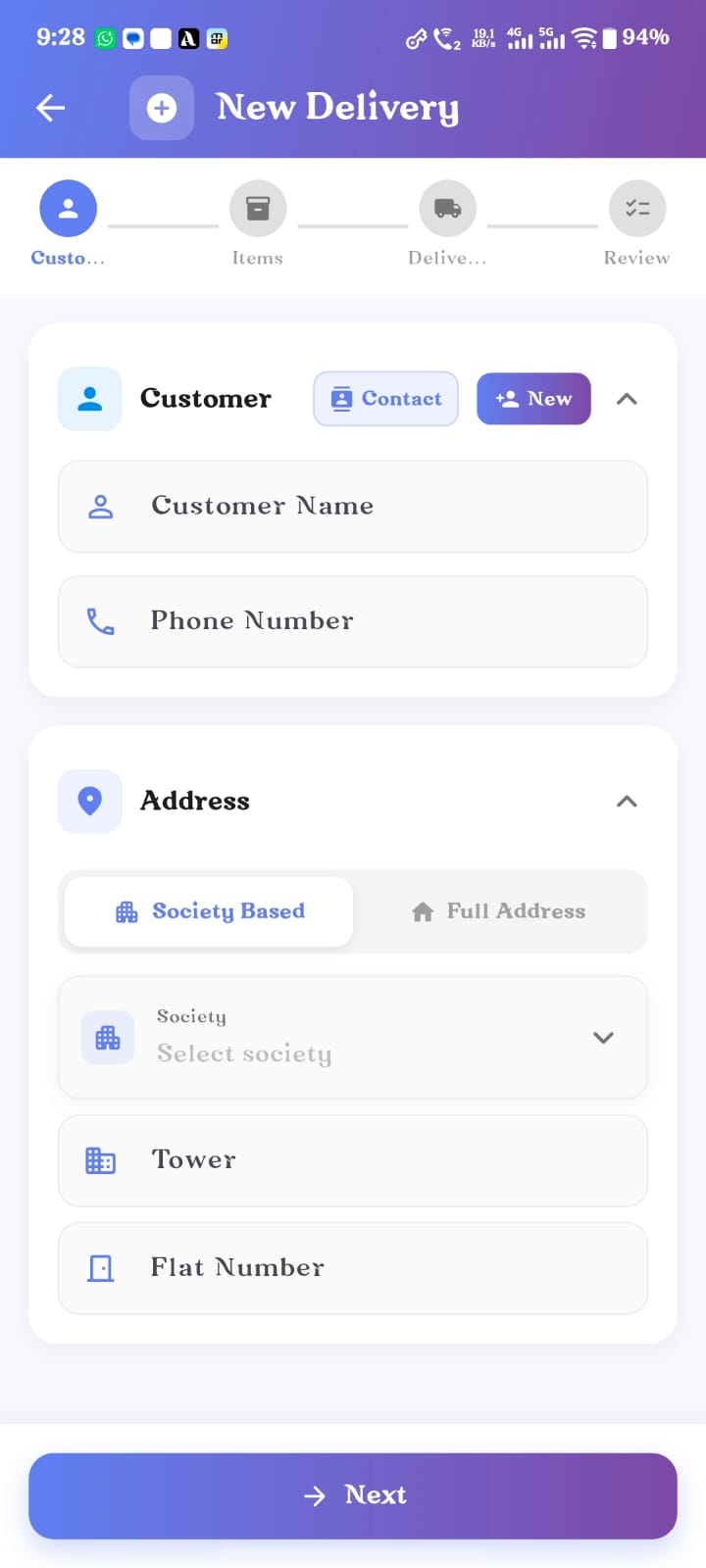
Delivery bag first
Sometimes the work is only about delivery tracking: a bag, a route, a society, a delivery person and proof of completion. Delivora should allow that delivery bag to start directly, without forcing the owner through a complete order-to-delivery flow.
Faster entry
Less manual work
Cleaner follow-up
Society route optimisation
For tiffin sellers, society popup sellers and local delivery teams, the hard part is not just assigning a delivery person. It is grouping orders in a practical route, reducing confusion, and keeping collection status visible for every stop.
Faster entry
Less manual work
Cleaner follow-up


ORDER INSIGHTS
Order value and AOV
See total order value and average order value for the selected range.
Collected vs outstanding
Separate collected money from pending payments so follow-up is clear.
Order health
Compare confirmed, cancelled and delivery-created orders at a glance.
Trends and operations
Switch between overview, trends and operations without leaving the insights screen.
Ideal for owners who want one daily business pulse before checking delivery execution.
DAILY DELIVERY REPORTS
End every delivery day with a clear report.
Owners can review how many bags were delivered, what is still pending, which delivery person handled each route and where collections or follow-ups are still open. It turns the delivery day into a simple closing report instead of scattered notes.
Delivered vs pending
See what closed today and what still needs attention.
Collections due
Track COD, balance due and payment follow-ups beside delivery status.
Delivery-person summary
Review each person’s assigned, completed and pending work.
Route and society view
Spot which societies, towers or routes created the day’s workload.

Management layer
Item management
Create and reuse items with units, pricing, search, availability and operational notes.
Customer management
Maintain phone, address, society, tower, flat, order history, payment context and repeat order patterns.
Invoice generation
Generate invoices from confirmed order and customer records so billing does not become a separate manual task.
More questions, answered simply.
Can my team review AI-scanned order details before confirming?
Yes. Delivora is designed around human review, so customer, item, quantity, address and delivery details can be checked before the work is confirmed.
Can I create a delivery bag without a full order flow?
Yes. Delivery bags can start directly when the job is only about route, society, delivery person, status and proof of completion.
Does Delivora help group society-wise deliveries?
Yes. It supports society, tower and route grouping so teams can execute deliveries in a practical sequence and keep collection status visible.
Can invoices use confirmed order and customer data?
Yes. Invoices can be generated from confirmed order and customer records so billing does not need to be rebuilt manually.
What can owners check at the end of the day?
Owners can review delivered and pending work, delivery-person summaries, route activity, collections due and daily report exports.
Is this useful for restaurants as well as tiffin sellers?
Yes. Restaurants can use Delivora for order intake, kitchen stages, delivery assignment, payments, customer history and follow-up.
Use Delivora to capture, prepare, deliver, collect and retain customers with fewer disconnected tools.